What Is a UX Audit and Why It Matters for SaaS

A strategic, human-led analysis of your product experience that uncovers usability issues, growth blockers, and opportunities to improve retention and conversion.

Yana Slyshchenko
Yana SlyshchenkoJan 27, 2026
Having a clear plan with defined objectives helps focus a UX audit on high impact issues and avoid wasted effort on low value findings

How to run a UX audit for B2B SaaS websites (and when to do it)

In B2B SaaS, growth rarely stalls because the product lacks features. It stalls because users don’t reach value fast enough or they hit friction at the exact moments that matter, like first-time setup, onboarding, core workflows, and upgrade paths.

The tricky part is that UX issues don’t always look dramatic. Sometimes it’s a missing feedback state, a confusing step in a flow, a dashboard that feels heavier than it should, or a decision that made sense months ago but now creates “silent” drop-offs. Teams often respond by adding more UI, more onboarding and more copy when the real need is to identify what’s breaking, why it’s breaking, and what to fix first.

That’s exactly what a UX audit is. A structured way to evaluate the experience with a pragmatic lens, combining heuristic review with behavioral evidence. The output is a prioritized set of issues tied to business impact: adoption, activation, retention, and conversion.


What is a UX Audit?

A UX audit is a systematic evaluation of how users move through a product and where they get stuck. It checks whether key flows are understandable, whether information shows up at the right time, and whether users can complete important tasks without unnecessary effort.

The goal is to uncover usability issues and conversion blockers or, in other words, the points where users hesitate, misread what’s happening, or abandon a journey. A good audit clarifies:

  • where problems occur

  • why they happen

  • what they’re costing you in business outcomes like activation, adoption, and conversion

Example: if onboarding asks users to connect software and configure settings before they’ve seen any value, you’ll often see hesitation and drop-off right after signup. A UX audit flags this as “effort before value” and recommends a value-ladder onboarding that shows outcomes early and builds commitment step by step.

A UX audit can focus on different surfaces depending on the problem: a marketing website, onboarding, a dashboard, checkout, or a single feature.
UX audits help you focus on the most impactful problems instead of surface level issues  By setting clear targets you turn insights into actionable decisions faster


Not all UX evaluations are the same: UX review, heuristic evaluation, and UX audit

Event though these terms are often used interchangeably, they don’t mean the same thing.


UX REVIEW

A UX review is usually a lightweight, qualitative assessment of an interface. It’s helpful for quick feedback, but it’s limited in scope and often subjective. Reviews tend to surface what feels wrong, without fully explaining why it matters or what to do next.


HEURISTIC EVALUTATION

Heuristic evaluations help checking an interface against established usability principles (clarity, consistency, feedback, error prevention, etc.). This method is extremely valuable and is a core component of most UX audits. However, on its own, heuristic evaluation doesn’t explain which issues have the highest business impact and whether problems affect real users at scale. This is why heuristic evaluation works best when paired with data.


UX AUDIT

UX audits are broader and more diagnostic. An audit often includes heuristic evaluation, key flow analysis, UX pattern assessment, analytics or funnel review, accessibility checks, and, when possible, signals from real users. This can mean reviewing product analytics, watching session recordings, or talking to a small number of users to understand where expectations and reality diverge. That’s why SaaS teams rely on UX audits when they need clarity and direction, especially in products where small UX problems quietly compound into larger adoption and conversion losses.
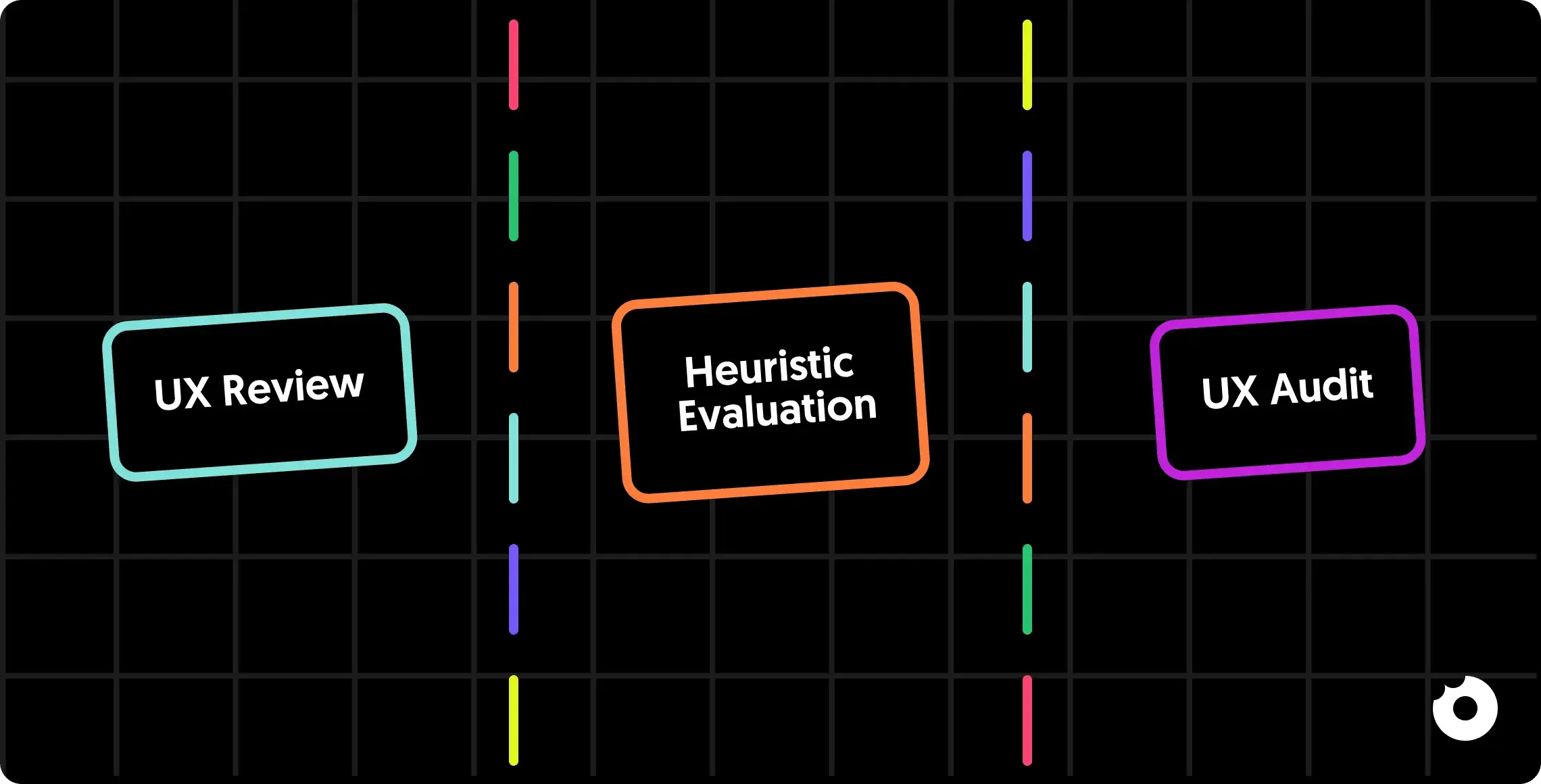
A UX review gives quick feedback to spot obvious usability issues  Heuristic evaluation applies principles to assess consistency and usability  A UX audit combines data and strategy to drive prioritized decisions


How to conduct your UX audit: the step by step process

A UX audit only works if it’s structured. Otherwise, you end up with a scattered list of opinions, edge cases, and “nice-to-have” improvements with no clear sense of impact. The point of the process is straightforward: find the friction, validate it with data, and turn it into actions the team can ship.

That requires a sequence, because it’s the fastest way to go from “something feels off” to “here’s what’s broken, here’s why, and here’s what to do next.” Here’s how a UX audit is typically run.


Step 1: Alignment and context

A UX audit starts with alignment. Before diving into screens, the auditor and team must agree on goals, scope, and priority areas.

You define what’s in focus (onboarding, activation, a core feature), what success means, and which business questions the audit should resolve. You also unlock access to the inputs that make the audit credible: environments, analytics, existing research, personas, and internal context.

Skip this step and the audit usually turns into generic feedback. Useful in theory, hard to act on in practice.


Step 2: Heuristic evaluation and usability analysis

Once the scope is clear, the UX audit moves into a structured usability review. This phase uses heuristic evaluation to quickly surface common UX issues, inconsistencies, and anti-patterns across the flow.

The goal isn’t deep interpretation yet, it’s coverage. You’re looking for clarity and hierarchy problems, missing feedback, confusing interactions, and broken expectations that make users hesitate or take the wrong action. These findings typically become a baseline list of usability issues, often with an initial severity or risk rating to help with prioritization.


Step 3: Analytics, behavior data, and UX metrics review

Next, qualitative findings are grounded in real usage data. Analytics and behavioral signals help confirm whether the issues identified in the review affect users in practice and how often.

This typically includes funnels and drop-off points, activation paths, heatmaps, scroll depth, session recordings, and early retention signals when available. The purpose here is to understand where users struggle at scale and where friction turns into measurable loss.

This step separates “could be a UX issue” from “is a UX issue,” so the audit focuses on what materially impacts behavior.


Step 4: User flows, information architecture, and conversion path assessment

With usability insights and behavioral evidence in hand, the UX audit zooms out to evaluate end-to-end journeys: onboarding, navigation, key task flows, and conversion paths.

The focus now shifts to how the experience is structured in terms of information architecture, sequencing, and task completion. You’re looking for where users lose context, get stuck between steps, or fail to progress toward value. This is often where deeper issues emerge, from broken value sequencing to unclear priorities and mental models the product assumes but users don’t share.

At this point in the audit process, you have a clear picture of where and why users hesitate, drop off, or never reach key moments in the journey.


Step 5: Prioritized recommendations and next steps

A SaaS website UX audit only becomes valuable when insights turn into decisions. The final step translates findings into actionable recommendations, prioritized by severity, expected impact, and effort.

Instead of an unfiltered issue dump, the team gets clear direction on what to fix first, what can wait, and what requires deeper structural changes versus quick improvements. Tools like impact-effort framing, priority grids, and concrete next-step suggestions turn the audit into a roadmap.

This is what prevents the audit from ending as documentation and makes it a plan the team can realistically execute.


UX audit checklist: what a solid audit includes

But what makes a UX audit solid and actionable? This checklist outlines the core elements every effective UX audit should cover.

  • Clear goals and success criteria: the audit starts by defining what it needs to support (activation, conversion, retention, or a specific business decision).

  • Defined scope and focus areas: the audit makes it clear which surfaces are included (website, onboarding, core flows, features) to avoid shallow or unfocused findings.

  • First-time user walkthrough: the experience is reviewed from a new user’s perspective to check how quickly value becomes clear and where effort is required too early.

  • Heuristic evaluation of key screens: core screens and flows are reviewed against usability principles to surface clarity, hierarchy, consistency, and feedback issues.

  • Critical user flows analysis: end-to-end journeys are mapped to identify friction, unnecessary steps, or broken sequencing between actions.

  • Behavioral data validation: findings are validated using analytics, drop-off points, funnels, or recordings to confirm they affect real users.

  • Information architecture review: navigation, grouping, and structure are assessed to ensure users can find and understand what they need at the right moment.

  • Conversion and value paths review: signup, activation, upgrades, or key actions are analyzed to detect where users hesitate or abandon before reaching value.

  • Root-cause framing of issues: problems are explained in terms of why they happen, not just where they appear, to avoid cosmetic fixes.

  • Prioritized recommendations: issues are ranked by impact and effort to clarify what to fix first, what can wait, and what requires deeper changes.

  • Actionable next steps: the audit ends with clear guidance the team can realistically execute, not just observations.
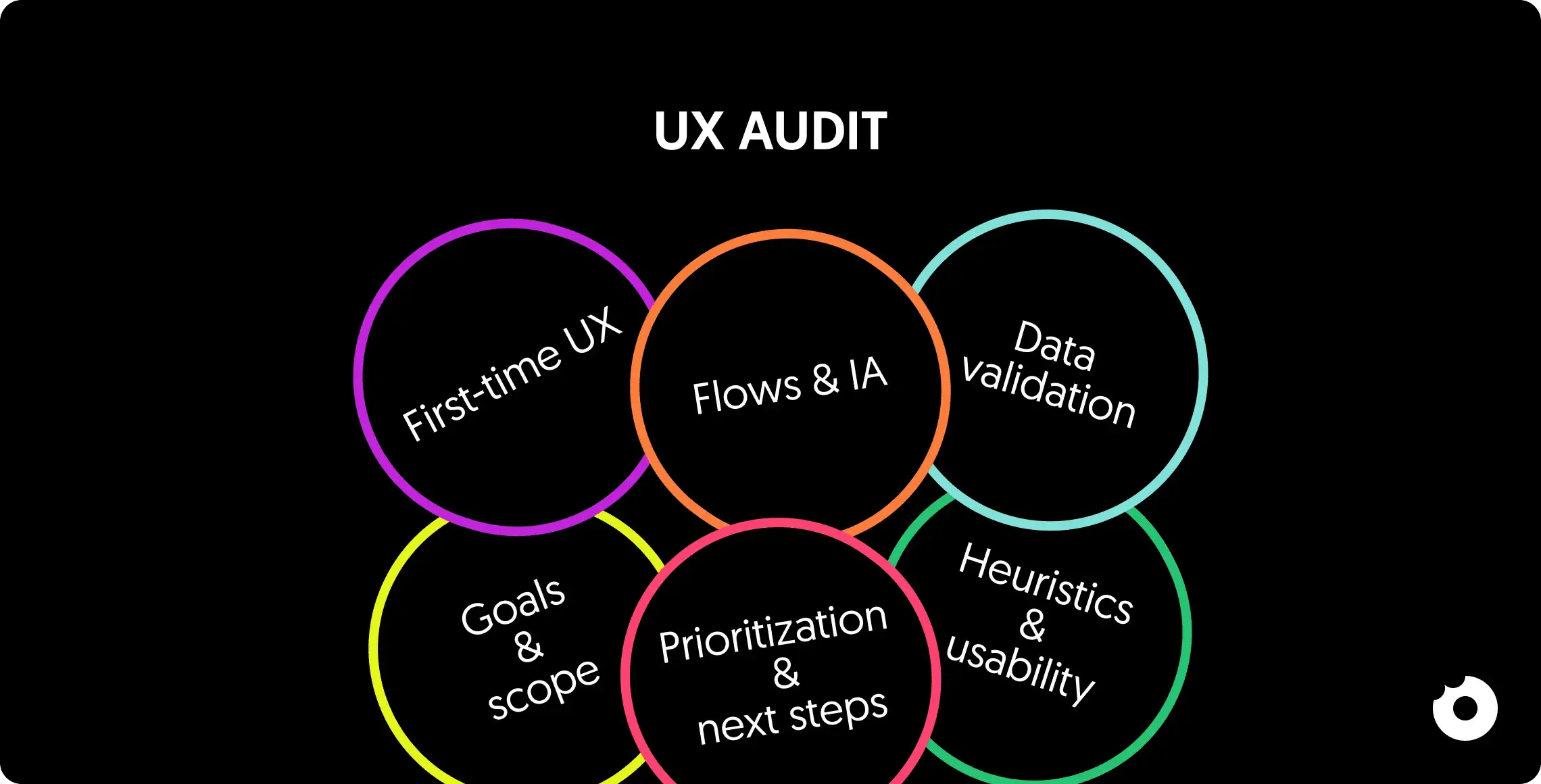
UX audit overview showing key areas like flows usability data validation goals and prioritization


When to choose a UX audit agency instead of doing it internally

Running a UX audit internally can work in some situations, especially for quick checks or small, well-understood issues. But there are clear cases where bringing in a UX audit agency leads to better, faster outcomes.

One of the most common reasons? Lack of bandwidth. Product and design teams are usually focused on shipping, firefighting, and meeting roadmap commitments. A UX audit requires dedicated, uninterrupted time that internal teams often can’t realistically carve out without slowing delivery.

Objectivity is another critical factor. Internal teams are too close to the product. They know why decisions were made, which constraints existed, and what trade-offs were accepted. That context, while valuable, also makes it harder to spot where users struggle or where assumptions no longer hold. A UX audit agency brings an external, unbiased perspective and can challenge decisions without internal politics.

Agencies are especially valuable when SaaS-specific experience matters. Products with onboarding flows, activation funnels, pricing logic, and retention mechanics benefit from auditors who have seen the same patterns (and the same failures) across multiple SaaS products. This pattern recognition helps distinguish real problems from noise and speeds up diagnosis.

In short, if your team needs speed, objectivity, and SaaS-focused insight rather than another round of internal discussion, choosing a UX audit agency is usually the right call. Want an external perspective on your UX? Contact us and share a bit about your product and goals.


UX audit services: what SaaS companies should expect

Once you decide to involve a UX audit agency, the question becomes what “professional” actually means in practice.

A serious UX audit service starts by framing the problem correctly. Scope is defined around the surfaces that drive outcomes, goals are clarified, and existing inputs are reviewed: analytics, customer feedback, support signals, and any internal research. This keeps the audit anchored to real product decisions, not generic UX commentary.

From there, professional UX auditing services apply a structured evaluation across key journeys. This typically combines usability analysis with a UX audit heuristic evaluation to surface friction points, inconsistencies, and moments where users lose context or fail to reach value. The emphasis is on diagnosing issues that affect how SaaS products are adopted and used day to day.

But the main value of the service shows up in synthesis. Instead of handing over raw findings, strong UX audit services connect issues across flows, identify root causes, and translate them into recommendations teams can ship. Prioritization is built in, so it’s clear what to address first, what can wait, and what requires deeper structural change.

Naturally, professional services include handoff and clarification. Findings are walked through with the team, reasoning is made explicit, and open questions are resolved. This way, insights don’t stay trapped in a document, they turn into decisions and execution.


What you actually get in a professional UX audit

A professional UX audit should leave SaaS teams with concrete outputs they can immediately work with.

While formats may vary, strong UX audit services typically include the following deliverables:

  • Structured UX audit report: a concise, decision-oriented summary of key findings, core problems, and risks. A document designed to support prioritization and product decisions, not a long, hard-to-read PDF.

  • UX audit heuristic evaluation matrix: a structured breakdown of usability principles applied across audited flows, highlighting where clarity, consistency, feedback, or error prevention break down at a systemic level.

  • Analytics and behavioral insights: a synthesis of available data such as funnels, drop-off points, activation paths, or usage patterns, used to validate UX issues and connect them to real user behavior and business impact.

  • UX scorecard or product health snapshot: a high-level view of how critical areas like onboarding, activation, and core workflows perform, helping teams quickly identify strengths, weaknesses, and risk zones.

  • Prioritized roadmap: a clear impact–effort–based plan that shows what to implement first, what can follow, and which improvements require deeper structural work rather than quick fixes.
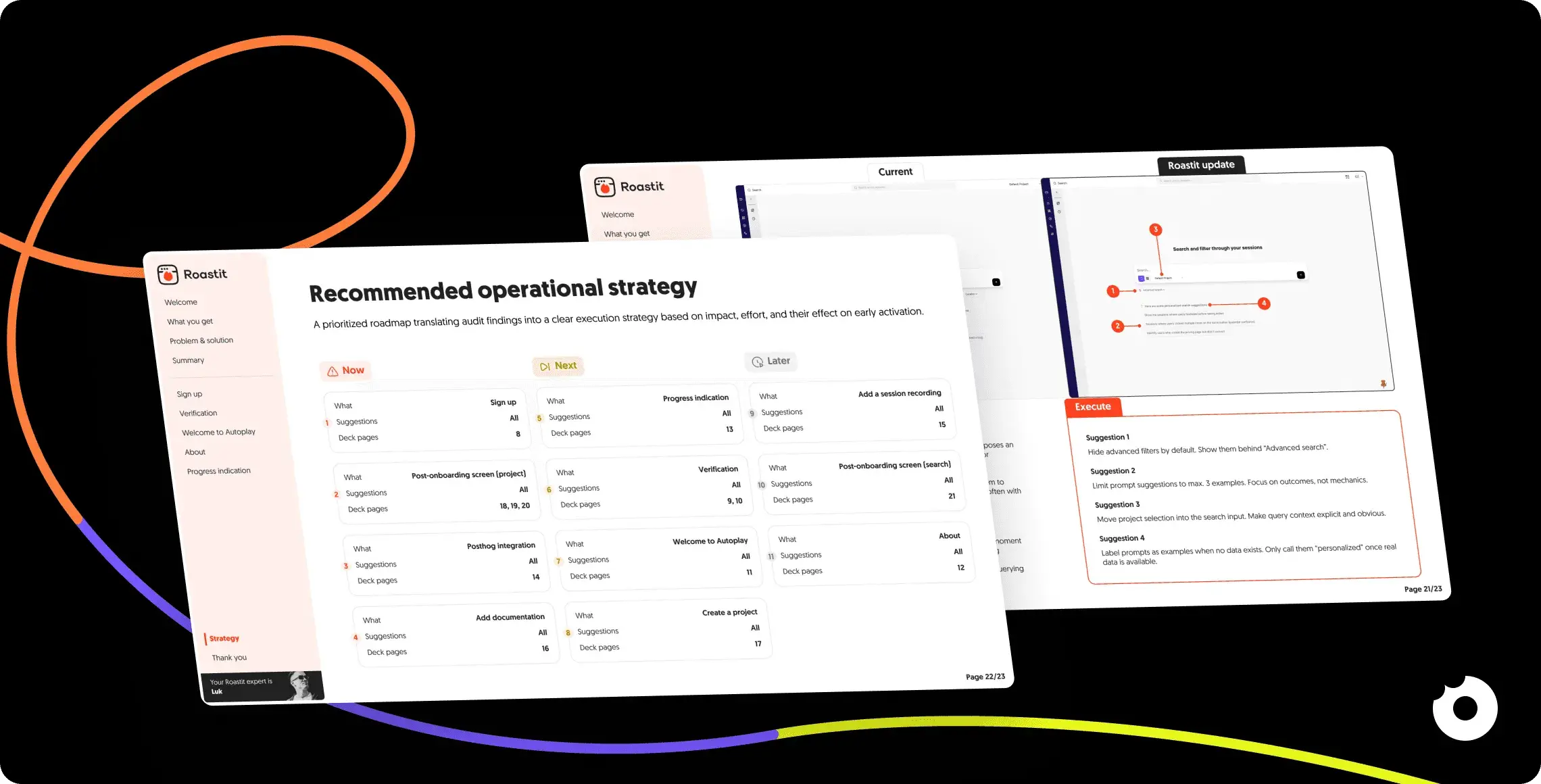
Screens showing a Roastit UX audit report with a recommended operational strategy roadmap and annotated interface improvements on a dark background


When is the best moment to run a UX audit?

In B2B SaaS, timing matters. A UX audit run at the right moment can stop small UX issues from becoming long-term growth blockers and give teams clarity when it counts.

Audits deliver the most value when a SaaS product hits a moment of change, pressure, or uncertainty. Here are some key moments:

  • Before fundraising or investor conversations: a UX audit helps you understand where the product is strong and where it’s leaking value, so you can address risks early and align the story around activation and adoption.

  • Right before a launch (MVP, redesign, new market): auditing key flows at this stage catches usability gaps and value-communication issues before they reach real users.

  • After a drop in activation or conversion: when metrics decline and the cause isn’t obvious, a UX audit helps isolate where the issue sits instead of defaulting to feature changes or pricing tests.

  • Before a redesign: teams audit first to avoid redesigning the wrong things. The audit clarifies what actually needs to change and what’s already working, saving time and development effort.

  • After major feature rollouts: new functionality can disrupt existing journeys or overload users with new decisions. A UX audit checks how well features integrate into the experience and whether they help users reach value.

But is it really worth it?

Yes, when you need clarity on what to fix and why you sure do.

If your B2B SaaS product is live and users are signing up, but key outcomes aren’t where they should be, an audit is what will help you identify where momentum is lost and which changes are most likely to improve results.

If you’re looking for a SaaS-focused UX audit that leads to clear, actionable next steps, you can count on us. At Donux, we help B2B teams diagnose friction and move forward with confidence. Get in touch to discuss your product and the flows that matter most.

How to run a UX audit for B2B SaaS websites (and when to do it)

In B2B SaaS, growth rarely stalls because the product lacks features. It stalls because users don’t reach value fast enough or they hit friction at the exact moments that matter, like first-time setup, onboarding, core workflows, and upgrade paths.

The tricky part is that UX issues don’t always look dramatic. Sometimes it’s a missing feedback state, a confusing step in a flow, a dashboard that feels heavier than it should, or a decision that made sense months ago but now creates “silent” drop-offs. Teams often respond by adding more UI, more onboarding and more copy when the real need is to identify what’s breaking, why it’s breaking, and what to fix first.

That’s exactly what a UX audit is. A structured way to evaluate the experience with a pragmatic lens, combining heuristic review with behavioral evidence. The output is a prioritized set of issues tied to business impact: adoption, activation, retention, and conversion.


What is a UX Audit?

A UX audit is a systematic evaluation of how users move through a product and where they get stuck. It checks whether key flows are understandable, whether information shows up at the right time, and whether users can complete important tasks without unnecessary effort.

The goal is to uncover usability issues and conversion blockers or, in other words, the points where users hesitate, misread what’s happening, or abandon a journey. A good audit clarifies:

  • where problems occur

  • why they happen

  • what they’re costing you in business outcomes like activation, adoption, and conversion

Example: if onboarding asks users to connect software and configure settings before they’ve seen any value, you’ll often see hesitation and drop-off right after signup. A UX audit flags this as “effort before value” and recommends a value-ladder onboarding that shows outcomes early and builds commitment step by step.

A UX audit can focus on different surfaces depending on the problem: a marketing website, onboarding, a dashboard, checkout, or a single feature.

UX audits help you focus on the most impactful problems instead of surface level issues  By setting clear targets you turn insights into actionable decisions faster


Not all UX evaluations are the same: UX review, heuristic evaluation, and UX audit

Event though these terms are often used interchangeably, they don’t mean the same thing.


UX REVIEW

A UX review is usually a lightweight, qualitative assessment of an interface. It’s helpful for quick feedback, but it’s limited in scope and often subjective. Reviews tend to surface what feels wrong, without fully explaining why it matters or what to do next.


HEURISTIC EVALUTATION

Heuristic evaluations help checking an interface against established usability principles (clarity, consistency, feedback, error prevention, etc.). This method is extremely valuable and is a core component of most UX audits. However, on its own, heuristic evaluation doesn’t explain which issues have the highest business impact and whether problems affect real users at scale. This is why heuristic evaluation works best when paired with data.


UX AUDIT

UX audits are broader and more diagnostic. An audit often includes heuristic evaluation, key flow analysis, UX pattern assessment, analytics or funnel review, accessibility checks, and, when possible, signals from real users. This can mean reviewing product analytics, watching session recordings, or talking to a small number of users to understand where expectations and reality diverge. That’s why SaaS teams rely on UX audits when they need clarity and direction, especially in products where small UX problems quietly compound into larger adoption and conversion losses.

A UX review gives quick feedback to spot obvious usability issues  Heuristic evaluation applies principles to assess consistency and usability  A UX audit combines data and strategy to drive prioritized decisions


How to conduct your UX audit: the step by step process

A UX audit only works if it’s structured. Otherwise, you end up with a scattered list of opinions, edge cases, and “nice-to-have” improvements with no clear sense of impact. The point of the process is straightforward: find the friction, validate it with data, and turn it into actions the team can ship.

That requires a sequence, because it’s the fastest way to go from “something feels off” to “here’s what’s broken, here’s why, and here’s what to do next.” Here’s how a UX audit is typically run.


Step 1: Alignment and context

A UX audit starts with alignment. Before diving into screens, the auditor and team must agree on goals, scope, and priority areas.

You define what’s in focus (onboarding, activation, a core feature), what success means, and which business questions the audit should resolve. You also unlock access to the inputs that make the audit credible: environments, analytics, existing research, personas, and internal context.

Skip this step and the audit usually turns into generic feedback. Useful in theory, hard to act on in practice.


Step 2: Heuristic evaluation and usability analysis

Once the scope is clear, the UX audit moves into a structured usability review. This phase uses heuristic evaluation to quickly surface common UX issues, inconsistencies, and anti-patterns across the flow.

The goal isn’t deep interpretation yet, it’s coverage. You’re looking for clarity and hierarchy problems, missing feedback, confusing interactions, and broken expectations that make users hesitate or take the wrong action. These findings typically become a baseline list of usability issues, often with an initial severity or risk rating to help with prioritization.


Step 3: Analytics, behavior data, and UX metrics review

Next, qualitative findings are grounded in real usage data. Analytics and behavioral signals help confirm whether the issues identified in the review affect users in practice and how often.

This typically includes funnels and drop-off points, activation paths, heatmaps, scroll depth, session recordings, and early retention signals when available. The purpose here is to understand where users struggle at scale and where friction turns into measurable loss.

This step separates “could be a UX issue” from “is a UX issue,” so the audit focuses on what materially impacts behavior.


Step 4: User flows, information architecture, and conversion path assessment

With usability insights and behavioral evidence in hand, the UX audit zooms out to evaluate end-to-end journeys: onboarding, navigation, key task flows, and conversion paths.

The focus now shifts to how the experience is structured in terms of information architecture, sequencing, and task completion. You’re looking for where users lose context, get stuck between steps, or fail to progress toward value. This is often where deeper issues emerge, from broken value sequencing to unclear priorities and mental models the product assumes but users don’t share.

At this point in the audit process, you have a clear picture of where and why users hesitate, drop off, or never reach key moments in the journey.


Step 5: Prioritized recommendations and next steps

A SaaS website UX audit only becomes valuable when insights turn into decisions. The final step translates findings into actionable recommendations, prioritized by severity, expected impact, and effort.

Instead of an unfiltered issue dump, the team gets clear direction on what to fix first, what can wait, and what requires deeper structural changes versus quick improvements. Tools like impact-effort framing, priority grids, and concrete next-step suggestions turn the audit into a roadmap.

This is what prevents the audit from ending as documentation and makes it a plan the team can realistically execute.


UX audit checklist: what a solid audit includes

But what makes a UX audit solid and actionable? This checklist outlines the core elements every effective UX audit should cover.

  • Clear goals and success criteria: the audit starts by defining what it needs to support (activation, conversion, retention, or a specific business decision).

  • Defined scope and focus areas: the audit makes it clear which surfaces are included (website, onboarding, core flows, features) to avoid shallow or unfocused findings.

  • First-time user walkthrough: the experience is reviewed from a new user’s perspective to check how quickly value becomes clear and where effort is required too early.

  • Heuristic evaluation of key screens: core screens and flows are reviewed against usability principles to surface clarity, hierarchy, consistency, and feedback issues.

  • Critical user flows analysis: end-to-end journeys are mapped to identify friction, unnecessary steps, or broken sequencing between actions.

  • Behavioral data validation: findings are validated using analytics, drop-off points, funnels, or recordings to confirm they affect real users.

  • Information architecture review: navigation, grouping, and structure are assessed to ensure users can find and understand what they need at the right moment.

  • Conversion and value paths review: signup, activation, upgrades, or key actions are analyzed to detect where users hesitate or abandon before reaching value.

  • Root-cause framing of issues: problems are explained in terms of why they happen, not just where they appear, to avoid cosmetic fixes.

  • Prioritized recommendations: issues are ranked by impact and effort to clarify what to fix first, what can wait, and what requires deeper changes.

  • Actionable next steps: the audit ends with clear guidance the team can realistically execute, not just observations.

UX audit overview showing key areas like flows usability data validation goals and prioritization


When to choose a UX audit agency instead of doing it internally

Running a UX audit internally can work in some situations, especially for quick checks or small, well-understood issues. But there are clear cases where bringing in a UX audit agency leads to better, faster outcomes.

One of the most common reasons? Lack of bandwidth. Product and design teams are usually focused on shipping, firefighting, and meeting roadmap commitments. A UX audit requires dedicated, uninterrupted time that internal teams often can’t realistically carve out without slowing delivery.

Objectivity is another critical factor. Internal teams are too close to the product. They know why decisions were made, which constraints existed, and what trade-offs were accepted. That context, while valuable, also makes it harder to spot where users struggle or where assumptions no longer hold. A UX audit agency brings an external, unbiased perspective and can challenge decisions without internal politics.

Agencies are especially valuable when SaaS-specific experience matters. Products with onboarding flows, activation funnels, pricing logic, and retention mechanics benefit from auditors who have seen the same patterns (and the same failures) across multiple SaaS products. This pattern recognition helps distinguish real problems from noise and speeds up diagnosis.

In short, if your team needs speed, objectivity, and SaaS-focused insight rather than another round of internal discussion, choosing a UX audit agency is usually the right call. Want an external perspective on your UX? Contact us and share a bit about your product and goals.


UX audit services: what SaaS companies should expect

Once you decide to involve a UX audit agency, the question becomes what “professional” actually means in practice.

A serious UX audit service starts by framing the problem correctly. Scope is defined around the surfaces that drive outcomes, goals are clarified, and existing inputs are reviewed: analytics, customer feedback, support signals, and any internal research. This keeps the audit anchored to real product decisions, not generic UX commentary.

From there, professional UX auditing services apply a structured evaluation across key journeys. This typically combines usability analysis with a UX audit heuristic evaluation to surface friction points, inconsistencies, and moments where users lose context or fail to reach value. The emphasis is on diagnosing issues that affect how SaaS products are adopted and used day to day.

But the main value of the service shows up in synthesis. Instead of handing over raw findings, strong UX audit services connect issues across flows, identify root causes, and translate them into recommendations teams can ship. Prioritization is built in, so it’s clear what to address first, what can wait, and what requires deeper structural change.

Naturally, professional services include handoff and clarification. Findings are walked through with the team, reasoning is made explicit, and open questions are resolved. This way, insights don’t stay trapped in a document, they turn into decisions and execution.


What you actually get in a professional UX audit

A professional UX audit should leave SaaS teams with concrete outputs they can immediately work with.

While formats may vary, strong UX audit services typically include the following deliverables:

  • Structured UX audit report: a concise, decision-oriented summary of key findings, core problems, and risks. A document designed to support prioritization and product decisions, not a long, hard-to-read PDF.

  • UX audit heuristic evaluation matrix: a structured breakdown of usability principles applied across audited flows, highlighting where clarity, consistency, feedback, or error prevention break down at a systemic level.

  • Analytics and behavioral insights: a synthesis of available data such as funnels, drop-off points, activation paths, or usage patterns, used to validate UX issues and connect them to real user behavior and business impact.

  • UX scorecard or product health snapshot: a high-level view of how critical areas like onboarding, activation, and core workflows perform, helping teams quickly identify strengths, weaknesses, and risk zones.

  • Prioritized roadmap: a clear impact–effort–based plan that shows what to implement first, what can follow, and which improvements require deeper structural work rather than quick fixes.

Screens showing a Roastit UX audit report with a recommended operational strategy roadmap and annotated interface improvements on a dark background


When is the best moment to run a UX audit?

In B2B SaaS, timing matters. A UX audit run at the right moment can stop small UX issues from becoming long-term growth blockers and give teams clarity when it counts.

Audits deliver the most value when a SaaS product hits a moment of change, pressure, or uncertainty. Here are some key moments:

  • Before fundraising or investor conversations: a UX audit helps you understand where the product is strong and where it’s leaking value, so you can address risks early and align the story around activation and adoption.

  • Right before a launch (MVP, redesign, new market): auditing key flows at this stage catches usability gaps and value-communication issues before they reach real users.

  • After a drop in activation or conversion: when metrics decline and the cause isn’t obvious, a UX audit helps isolate where the issue sits instead of defaulting to feature changes or pricing tests.

  • Before a redesign: teams audit first to avoid redesigning the wrong things. The audit clarifies what actually needs to change and what’s already working, saving time and development effort.

  • After major feature rollouts: new functionality can disrupt existing journeys or overload users with new decisions. A UX audit checks how well features integrate into the experience and whether they help users reach value.

But is it really worth it?

Yes, when you need clarity on what to fix and why you sure do.

If your B2B SaaS product is live and users are signing up, but key outcomes aren’t where they should be, an audit is what will help you identify where momentum is lost and which changes are most likely to improve results.

If you’re looking for a SaaS-focused UX audit that leads to clear, actionable next steps, you can count on us. At Donux, we help B2B teams diagnose friction and move forward with confidence. Get in touch to discuss your product and the flows that matter most.

How to run a UX audit for B2B SaaS websites (and when to do it)

In B2B SaaS, growth rarely stalls because the product lacks features. It stalls because users don’t reach value fast enough or they hit friction at the exact moments that matter, like first-time setup, onboarding, core workflows, and upgrade paths.

The tricky part is that UX issues don’t always look dramatic. Sometimes it’s a missing feedback state, a confusing step in a flow, a dashboard that feels heavier than it should, or a decision that made sense months ago but now creates “silent” drop-offs. Teams often respond by adding more UI, more onboarding and more copy when the real need is to identify what’s breaking, why it’s breaking, and what to fix first.

That’s exactly what a UX audit is. A structured way to evaluate the experience with a pragmatic lens, combining heuristic review with behavioral evidence. The output is a prioritized set of issues tied to business impact: adoption, activation, retention, and conversion.


What is a UX Audit?

A UX audit is a systematic evaluation of how users move through a product and where they get stuck. It checks whether key flows are understandable, whether information shows up at the right time, and whether users can complete important tasks without unnecessary effort.

The goal is to uncover usability issues and conversion blockers or, in other words, the points where users hesitate, misread what’s happening, or abandon a journey. A good audit clarifies:

  • where problems occur

  • why they happen

  • what they’re costing you in business outcomes like activation, adoption, and conversion

Example: if onboarding asks users to connect software and configure settings before they’ve seen any value, you’ll often see hesitation and drop-off right after signup. A UX audit flags this as “effort before value” and recommends a value-ladder onboarding that shows outcomes early and builds commitment step by step.

A UX audit can focus on different surfaces depending on the problem: a marketing website, onboarding, a dashboard, checkout, or a single feature.

UX audits help you focus on the most impactful problems instead of surface level issues  By setting clear targets you turn insights into actionable decisions faster


Not all UX evaluations are the same: UX review, heuristic evaluation, and UX audit

Event though these terms are often used interchangeably, they don’t mean the same thing.


UX REVIEW

A UX review is usually a lightweight, qualitative assessment of an interface. It’s helpful for quick feedback, but it’s limited in scope and often subjective. Reviews tend to surface what feels wrong, without fully explaining why it matters or what to do next.


HEURISTIC EVALUTATION

Heuristic evaluations help checking an interface against established usability principles (clarity, consistency, feedback, error prevention, etc.). This method is extremely valuable and is a core component of most UX audits. However, on its own, heuristic evaluation doesn’t explain which issues have the highest business impact and whether problems affect real users at scale. This is why heuristic evaluation works best when paired with data.


UX AUDIT

UX audits are broader and more diagnostic. An audit often includes heuristic evaluation, key flow analysis, UX pattern assessment, analytics or funnel review, accessibility checks, and, when possible, signals from real users. This can mean reviewing product analytics, watching session recordings, or talking to a small number of users to understand where expectations and reality diverge. That’s why SaaS teams rely on UX audits when they need clarity and direction, especially in products where small UX problems quietly compound into larger adoption and conversion losses.

A UX review gives quick feedback to spot obvious usability issues  Heuristic evaluation applies principles to assess consistency and usability  A UX audit combines data and strategy to drive prioritized decisions


How to conduct your UX audit: the step by step process

A UX audit only works if it’s structured. Otherwise, you end up with a scattered list of opinions, edge cases, and “nice-to-have” improvements with no clear sense of impact. The point of the process is straightforward: find the friction, validate it with data, and turn it into actions the team can ship.

That requires a sequence, because it’s the fastest way to go from “something feels off” to “here’s what’s broken, here’s why, and here’s what to do next.” Here’s how a UX audit is typically run.


Step 1: Alignment and context

A UX audit starts with alignment. Before diving into screens, the auditor and team must agree on goals, scope, and priority areas.

You define what’s in focus (onboarding, activation, a core feature), what success means, and which business questions the audit should resolve. You also unlock access to the inputs that make the audit credible: environments, analytics, existing research, personas, and internal context.

Skip this step and the audit usually turns into generic feedback. Useful in theory, hard to act on in practice.


Step 2: Heuristic evaluation and usability analysis

Once the scope is clear, the UX audit moves into a structured usability review. This phase uses heuristic evaluation to quickly surface common UX issues, inconsistencies, and anti-patterns across the flow.

The goal isn’t deep interpretation yet, it’s coverage. You’re looking for clarity and hierarchy problems, missing feedback, confusing interactions, and broken expectations that make users hesitate or take the wrong action. These findings typically become a baseline list of usability issues, often with an initial severity or risk rating to help with prioritization.


Step 3: Analytics, behavior data, and UX metrics review

Next, qualitative findings are grounded in real usage data. Analytics and behavioral signals help confirm whether the issues identified in the review affect users in practice and how often.

This typically includes funnels and drop-off points, activation paths, heatmaps, scroll depth, session recordings, and early retention signals when available. The purpose here is to understand where users struggle at scale and where friction turns into measurable loss.

This step separates “could be a UX issue” from “is a UX issue,” so the audit focuses on what materially impacts behavior.


Step 4: User flows, information architecture, and conversion path assessment

With usability insights and behavioral evidence in hand, the UX audit zooms out to evaluate end-to-end journeys: onboarding, navigation, key task flows, and conversion paths.

The focus now shifts to how the experience is structured in terms of information architecture, sequencing, and task completion. You’re looking for where users lose context, get stuck between steps, or fail to progress toward value. This is often where deeper issues emerge, from broken value sequencing to unclear priorities and mental models the product assumes but users don’t share.

At this point in the audit process, you have a clear picture of where and why users hesitate, drop off, or never reach key moments in the journey.


Step 5: Prioritized recommendations and next steps

A SaaS website UX audit only becomes valuable when insights turn into decisions. The final step translates findings into actionable recommendations, prioritized by severity, expected impact, and effort.

Instead of an unfiltered issue dump, the team gets clear direction on what to fix first, what can wait, and what requires deeper structural changes versus quick improvements. Tools like impact-effort framing, priority grids, and concrete next-step suggestions turn the audit into a roadmap.

This is what prevents the audit from ending as documentation and makes it a plan the team can realistically execute.


UX audit checklist: what a solid audit includes

But what makes a UX audit solid and actionable? This checklist outlines the core elements every effective UX audit should cover.

  • Clear goals and success criteria: the audit starts by defining what it needs to support (activation, conversion, retention, or a specific business decision).

  • Defined scope and focus areas: the audit makes it clear which surfaces are included (website, onboarding, core flows, features) to avoid shallow or unfocused findings.

  • First-time user walkthrough: the experience is reviewed from a new user’s perspective to check how quickly value becomes clear and where effort is required too early.

  • Heuristic evaluation of key screens: core screens and flows are reviewed against usability principles to surface clarity, hierarchy, consistency, and feedback issues.

  • Critical user flows analysis: end-to-end journeys are mapped to identify friction, unnecessary steps, or broken sequencing between actions.

  • Behavioral data validation: findings are validated using analytics, drop-off points, funnels, or recordings to confirm they affect real users.

  • Information architecture review: navigation, grouping, and structure are assessed to ensure users can find and understand what they need at the right moment.

  • Conversion and value paths review: signup, activation, upgrades, or key actions are analyzed to detect where users hesitate or abandon before reaching value.

  • Root-cause framing of issues: problems are explained in terms of why they happen, not just where they appear, to avoid cosmetic fixes.

  • Prioritized recommendations: issues are ranked by impact and effort to clarify what to fix first, what can wait, and what requires deeper changes.

  • Actionable next steps: the audit ends with clear guidance the team can realistically execute, not just observations.

UX audit overview showing key areas like flows usability data validation goals and prioritization


When to choose a UX audit agency instead of doing it internally

Running a UX audit internally can work in some situations, especially for quick checks or small, well-understood issues. But there are clear cases where bringing in a UX audit agency leads to better, faster outcomes.

One of the most common reasons? Lack of bandwidth. Product and design teams are usually focused on shipping, firefighting, and meeting roadmap commitments. A UX audit requires dedicated, uninterrupted time that internal teams often can’t realistically carve out without slowing delivery.

Objectivity is another critical factor. Internal teams are too close to the product. They know why decisions were made, which constraints existed, and what trade-offs were accepted. That context, while valuable, also makes it harder to spot where users struggle or where assumptions no longer hold. A UX audit agency brings an external, unbiased perspective and can challenge decisions without internal politics.

Agencies are especially valuable when SaaS-specific experience matters. Products with onboarding flows, activation funnels, pricing logic, and retention mechanics benefit from auditors who have seen the same patterns (and the same failures) across multiple SaaS products. This pattern recognition helps distinguish real problems from noise and speeds up diagnosis.

In short, if your team needs speed, objectivity, and SaaS-focused insight rather than another round of internal discussion, choosing a UX audit agency is usually the right call. Want an external perspective on your UX? Contact us and share a bit about your product and goals.


UX audit services: what SaaS companies should expect

Once you decide to involve a UX audit agency, the question becomes what “professional” actually means in practice.

A serious UX audit service starts by framing the problem correctly. Scope is defined around the surfaces that drive outcomes, goals are clarified, and existing inputs are reviewed: analytics, customer feedback, support signals, and any internal research. This keeps the audit anchored to real product decisions, not generic UX commentary.

From there, professional UX auditing services apply a structured evaluation across key journeys. This typically combines usability analysis with a UX audit heuristic evaluation to surface friction points, inconsistencies, and moments where users lose context or fail to reach value. The emphasis is on diagnosing issues that affect how SaaS products are adopted and used day to day.

But the main value of the service shows up in synthesis. Instead of handing over raw findings, strong UX audit services connect issues across flows, identify root causes, and translate them into recommendations teams can ship. Prioritization is built in, so it’s clear what to address first, what can wait, and what requires deeper structural change.

Naturally, professional services include handoff and clarification. Findings are walked through with the team, reasoning is made explicit, and open questions are resolved. This way, insights don’t stay trapped in a document, they turn into decisions and execution.


What you actually get in a professional UX audit

A professional UX audit should leave SaaS teams with concrete outputs they can immediately work with.

While formats may vary, strong UX audit services typically include the following deliverables:

  • Structured UX audit report: a concise, decision-oriented summary of key findings, core problems, and risks. A document designed to support prioritization and product decisions, not a long, hard-to-read PDF.

  • UX audit heuristic evaluation matrix: a structured breakdown of usability principles applied across audited flows, highlighting where clarity, consistency, feedback, or error prevention break down at a systemic level.

  • Analytics and behavioral insights: a synthesis of available data such as funnels, drop-off points, activation paths, or usage patterns, used to validate UX issues and connect them to real user behavior and business impact.

  • UX scorecard or product health snapshot: a high-level view of how critical areas like onboarding, activation, and core workflows perform, helping teams quickly identify strengths, weaknesses, and risk zones.

  • Prioritized roadmap: a clear impact–effort–based plan that shows what to implement first, what can follow, and which improvements require deeper structural work rather than quick fixes.

Screens showing a Roastit UX audit report with a recommended operational strategy roadmap and annotated interface improvements on a dark background


When is the best moment to run a UX audit?

In B2B SaaS, timing matters. A UX audit run at the right moment can stop small UX issues from becoming long-term growth blockers and give teams clarity when it counts.

Audits deliver the most value when a SaaS product hits a moment of change, pressure, or uncertainty. Here are some key moments:

  • Before fundraising or investor conversations: a UX audit helps you understand where the product is strong and where it’s leaking value, so you can address risks early and align the story around activation and adoption.

  • Right before a launch (MVP, redesign, new market): auditing key flows at this stage catches usability gaps and value-communication issues before they reach real users.

  • After a drop in activation or conversion: when metrics decline and the cause isn’t obvious, a UX audit helps isolate where the issue sits instead of defaulting to feature changes or pricing tests.

  • Before a redesign: teams audit first to avoid redesigning the wrong things. The audit clarifies what actually needs to change and what’s already working, saving time and development effort.

  • After major feature rollouts: new functionality can disrupt existing journeys or overload users with new decisions. A UX audit checks how well features integrate into the experience and whether they help users reach value.

But is it really worth it?

Yes, when you need clarity on what to fix and why you sure do.

If your B2B SaaS product is live and users are signing up, but key outcomes aren’t where they should be, an audit is what will help you identify where momentum is lost and which changes are most likely to improve results.

If you’re looking for a SaaS-focused UX audit that leads to clear, actionable next steps, you can count on us. At Donux, we help B2B teams diagnose friction and move forward with confidence. Get in touch to discuss your product and the flows that matter most.

How to run a UX audit for B2B SaaS websites (and when to do it)

In B2B SaaS, growth rarely stalls because the product lacks features. It stalls because users don’t reach value fast enough or they hit friction at the exact moments that matter, like first-time setup, onboarding, core workflows, and upgrade paths.

The tricky part is that UX issues don’t always look dramatic. Sometimes it’s a missing feedback state, a confusing step in a flow, a dashboard that feels heavier than it should, or a decision that made sense months ago but now creates “silent” drop-offs. Teams often respond by adding more UI, more onboarding and more copy when the real need is to identify what’s breaking, why it’s breaking, and what to fix first.

That’s exactly what a UX audit is. A structured way to evaluate the experience with a pragmatic lens, combining heuristic review with behavioral evidence. The output is a prioritized set of issues tied to business impact: adoption, activation, retention, and conversion.


What is a UX Audit?

A UX audit is a systematic evaluation of how users move through a product and where they get stuck. It checks whether key flows are understandable, whether information shows up at the right time, and whether users can complete important tasks without unnecessary effort.

The goal is to uncover usability issues and conversion blockers or, in other words, the points where users hesitate, misread what’s happening, or abandon a journey. A good audit clarifies:

  • where problems occur

  • why they happen

  • what they’re costing you in business outcomes like activation, adoption, and conversion

Example: if onboarding asks users to connect software and configure settings before they’ve seen any value, you’ll often see hesitation and drop-off right after signup. A UX audit flags this as “effort before value” and recommends a value-ladder onboarding that shows outcomes early and builds commitment step by step.

A UX audit can focus on different surfaces depending on the problem: a marketing website, onboarding, a dashboard, checkout, or a single feature.

UX audits help you focus on the most impactful problems instead of surface level issues  By setting clear targets you turn insights into actionable decisions faster


Not all UX evaluations are the same: UX review, heuristic evaluation, and UX audit

Event though these terms are often used interchangeably, they don’t mean the same thing.


UX REVIEW

A UX review is usually a lightweight, qualitative assessment of an interface. It’s helpful for quick feedback, but it’s limited in scope and often subjective. Reviews tend to surface what feels wrong, without fully explaining why it matters or what to do next.


HEURISTIC EVALUTATION

Heuristic evaluations help checking an interface against established usability principles (clarity, consistency, feedback, error prevention, etc.). This method is extremely valuable and is a core component of most UX audits. However, on its own, heuristic evaluation doesn’t explain which issues have the highest business impact and whether problems affect real users at scale. This is why heuristic evaluation works best when paired with data.


UX AUDIT

UX audits are broader and more diagnostic. An audit often includes heuristic evaluation, key flow analysis, UX pattern assessment, analytics or funnel review, accessibility checks, and, when possible, signals from real users. This can mean reviewing product analytics, watching session recordings, or talking to a small number of users to understand where expectations and reality diverge. That’s why SaaS teams rely on UX audits when they need clarity and direction, especially in products where small UX problems quietly compound into larger adoption and conversion losses.

A UX review gives quick feedback to spot obvious usability issues  Heuristic evaluation applies principles to assess consistency and usability  A UX audit combines data and strategy to drive prioritized decisions


How to conduct your UX audit: the step by step process

A UX audit only works if it’s structured. Otherwise, you end up with a scattered list of opinions, edge cases, and “nice-to-have” improvements with no clear sense of impact. The point of the process is straightforward: find the friction, validate it with data, and turn it into actions the team can ship.

That requires a sequence, because it’s the fastest way to go from “something feels off” to “here’s what’s broken, here’s why, and here’s what to do next.” Here’s how a UX audit is typically run.


Step 1: Alignment and context

A UX audit starts with alignment. Before diving into screens, the auditor and team must agree on goals, scope, and priority areas.

You define what’s in focus (onboarding, activation, a core feature), what success means, and which business questions the audit should resolve. You also unlock access to the inputs that make the audit credible: environments, analytics, existing research, personas, and internal context.

Skip this step and the audit usually turns into generic feedback. Useful in theory, hard to act on in practice.


Step 2: Heuristic evaluation and usability analysis

Once the scope is clear, the UX audit moves into a structured usability review. This phase uses heuristic evaluation to quickly surface common UX issues, inconsistencies, and anti-patterns across the flow.

The goal isn’t deep interpretation yet, it’s coverage. You’re looking for clarity and hierarchy problems, missing feedback, confusing interactions, and broken expectations that make users hesitate or take the wrong action. These findings typically become a baseline list of usability issues, often with an initial severity or risk rating to help with prioritization.


Step 3: Analytics, behavior data, and UX metrics review

Next, qualitative findings are grounded in real usage data. Analytics and behavioral signals help confirm whether the issues identified in the review affect users in practice and how often.

This typically includes funnels and drop-off points, activation paths, heatmaps, scroll depth, session recordings, and early retention signals when available. The purpose here is to understand where users struggle at scale and where friction turns into measurable loss.

This step separates “could be a UX issue” from “is a UX issue,” so the audit focuses on what materially impacts behavior.


Step 4: User flows, information architecture, and conversion path assessment

With usability insights and behavioral evidence in hand, the UX audit zooms out to evaluate end-to-end journeys: onboarding, navigation, key task flows, and conversion paths.

The focus now shifts to how the experience is structured in terms of information architecture, sequencing, and task completion. You’re looking for where users lose context, get stuck between steps, or fail to progress toward value. This is often where deeper issues emerge, from broken value sequencing to unclear priorities and mental models the product assumes but users don’t share.

At this point in the audit process, you have a clear picture of where and why users hesitate, drop off, or never reach key moments in the journey.


Step 5: Prioritized recommendations and next steps

A SaaS website UX audit only becomes valuable when insights turn into decisions. The final step translates findings into actionable recommendations, prioritized by severity, expected impact, and effort.

Instead of an unfiltered issue dump, the team gets clear direction on what to fix first, what can wait, and what requires deeper structural changes versus quick improvements. Tools like impact-effort framing, priority grids, and concrete next-step suggestions turn the audit into a roadmap.

This is what prevents the audit from ending as documentation and makes it a plan the team can realistically execute.


UX audit checklist: what a solid audit includes

But what makes a UX audit solid and actionable? This checklist outlines the core elements every effective UX audit should cover.

  • Clear goals and success criteria: the audit starts by defining what it needs to support (activation, conversion, retention, or a specific business decision).

  • Defined scope and focus areas: the audit makes it clear which surfaces are included (website, onboarding, core flows, features) to avoid shallow or unfocused findings.

  • First-time user walkthrough: the experience is reviewed from a new user’s perspective to check how quickly value becomes clear and where effort is required too early.

  • Heuristic evaluation of key screens: core screens and flows are reviewed against usability principles to surface clarity, hierarchy, consistency, and feedback issues.

  • Critical user flows analysis: end-to-end journeys are mapped to identify friction, unnecessary steps, or broken sequencing between actions.

  • Behavioral data validation: findings are validated using analytics, drop-off points, funnels, or recordings to confirm they affect real users.

  • Information architecture review: navigation, grouping, and structure are assessed to ensure users can find and understand what they need at the right moment.

  • Conversion and value paths review: signup, activation, upgrades, or key actions are analyzed to detect where users hesitate or abandon before reaching value.

  • Root-cause framing of issues: problems are explained in terms of why they happen, not just where they appear, to avoid cosmetic fixes.

  • Prioritized recommendations: issues are ranked by impact and effort to clarify what to fix first, what can wait, and what requires deeper changes.

  • Actionable next steps: the audit ends with clear guidance the team can realistically execute, not just observations.

UX audit overview showing key areas like flows usability data validation goals and prioritization


When to choose a UX audit agency instead of doing it internally

Running a UX audit internally can work in some situations, especially for quick checks or small, well-understood issues. But there are clear cases where bringing in a UX audit agency leads to better, faster outcomes.

One of the most common reasons? Lack of bandwidth. Product and design teams are usually focused on shipping, firefighting, and meeting roadmap commitments. A UX audit requires dedicated, uninterrupted time that internal teams often can’t realistically carve out without slowing delivery.

Objectivity is another critical factor. Internal teams are too close to the product. They know why decisions were made, which constraints existed, and what trade-offs were accepted. That context, while valuable, also makes it harder to spot where users struggle or where assumptions no longer hold. A UX audit agency brings an external, unbiased perspective and can challenge decisions without internal politics.

Agencies are especially valuable when SaaS-specific experience matters. Products with onboarding flows, activation funnels, pricing logic, and retention mechanics benefit from auditors who have seen the same patterns (and the same failures) across multiple SaaS products. This pattern recognition helps distinguish real problems from noise and speeds up diagnosis.

In short, if your team needs speed, objectivity, and SaaS-focused insight rather than another round of internal discussion, choosing a UX audit agency is usually the right call. Want an external perspective on your UX? Contact us and share a bit about your product and goals.


UX audit services: what SaaS companies should expect

Once you decide to involve a UX audit agency, the question becomes what “professional” actually means in practice.

A serious UX audit service starts by framing the problem correctly. Scope is defined around the surfaces that drive outcomes, goals are clarified, and existing inputs are reviewed: analytics, customer feedback, support signals, and any internal research. This keeps the audit anchored to real product decisions, not generic UX commentary.

From there, professional UX auditing services apply a structured evaluation across key journeys. This typically combines usability analysis with a UX audit heuristic evaluation to surface friction points, inconsistencies, and moments where users lose context or fail to reach value. The emphasis is on diagnosing issues that affect how SaaS products are adopted and used day to day.

But the main value of the service shows up in synthesis. Instead of handing over raw findings, strong UX audit services connect issues across flows, identify root causes, and translate them into recommendations teams can ship. Prioritization is built in, so it’s clear what to address first, what can wait, and what requires deeper structural change.

Naturally, professional services include handoff and clarification. Findings are walked through with the team, reasoning is made explicit, and open questions are resolved. This way, insights don’t stay trapped in a document, they turn into decisions and execution.


What you actually get in a professional UX audit

A professional UX audit should leave SaaS teams with concrete outputs they can immediately work with.

While formats may vary, strong UX audit services typically include the following deliverables:

  • Structured UX audit report: a concise, decision-oriented summary of key findings, core problems, and risks. A document designed to support prioritization and product decisions, not a long, hard-to-read PDF.

  • UX audit heuristic evaluation matrix: a structured breakdown of usability principles applied across audited flows, highlighting where clarity, consistency, feedback, or error prevention break down at a systemic level.

  • Analytics and behavioral insights: a synthesis of available data such as funnels, drop-off points, activation paths, or usage patterns, used to validate UX issues and connect them to real user behavior and business impact.

  • UX scorecard or product health snapshot: a high-level view of how critical areas like onboarding, activation, and core workflows perform, helping teams quickly identify strengths, weaknesses, and risk zones.

  • Prioritized roadmap: a clear impact–effort–based plan that shows what to implement first, what can follow, and which improvements require deeper structural work rather than quick fixes.

Screens showing a Roastit UX audit report with a recommended operational strategy roadmap and annotated interface improvements on a dark background


When is the best moment to run a UX audit?

In B2B SaaS, timing matters. A UX audit run at the right moment can stop small UX issues from becoming long-term growth blockers and give teams clarity when it counts.

Audits deliver the most value when a SaaS product hits a moment of change, pressure, or uncertainty. Here are some key moments:

  • Before fundraising or investor conversations: a UX audit helps you understand where the product is strong and where it’s leaking value, so you can address risks early and align the story around activation and adoption.

  • Right before a launch (MVP, redesign, new market): auditing key flows at this stage catches usability gaps and value-communication issues before they reach real users.

  • After a drop in activation or conversion: when metrics decline and the cause isn’t obvious, a UX audit helps isolate where the issue sits instead of defaulting to feature changes or pricing tests.

  • Before a redesign: teams audit first to avoid redesigning the wrong things. The audit clarifies what actually needs to change and what’s already working, saving time and development effort.

  • After major feature rollouts: new functionality can disrupt existing journeys or overload users with new decisions. A UX audit checks how well features integrate into the experience and whether they help users reach value.

But is it really worth it?

Yes, when you need clarity on what to fix and why you sure do.

If your B2B SaaS product is live and users are signing up, but key outcomes aren’t where they should be, an audit is what will help you identify where momentum is lost and which changes are most likely to improve results.

If you’re looking for a SaaS-focused UX audit that leads to clear, actionable next steps, you can count on us. At Donux, we help B2B teams diagnose friction and move forward with confidence. Get in touch to discuss your product and the flows that matter most.

Title

We’ll help you build the
right product

The first step is a quick chat

Donux srl © 2024 Via Carlo Farini 5, 20154 Milano P.IVA IT11315200961

Part of

We’ll help you build the
right product

The first step is a quick chat

Donux srl © 2024 Via Carlo Farini 5, 20154 Milano P.IVA IT11315200961

Part of